Fast STL and OBJ Reading in Python
Read and write STL and OBJ mesh files in Python straight into NumPy arrays. A 1M-triangle OBJ in 6.6 ms and a welded binary STL in 36.4 ms, measured against PyVista, trimesh and meshio. One pip install.
Most mesh work in Python starts with reading a file, and on large meshes the reader can take longer than the work. trueform reads STL and OBJ straight into NumPy arrays: an (N, 3) face array and an (M, 3) point array. STL triangles are welded into shared vertices as they load. One pip install. NumPy arrays in, NumPy arrays out. This tutorial covers reading and writing both formats, triangles, quads and mixed polygons, index and point dtypes, writing with a transformation, and measured read times against PyVista, trimesh and meshio.
Install
pip install trueform
See the installation guide for all options.
Reading STL
import numpy as np
import trueform as tf

faces, points = tf.read_stl("model.stl")
# faces:  (N, 3) int32
# points: (M, 3) float32
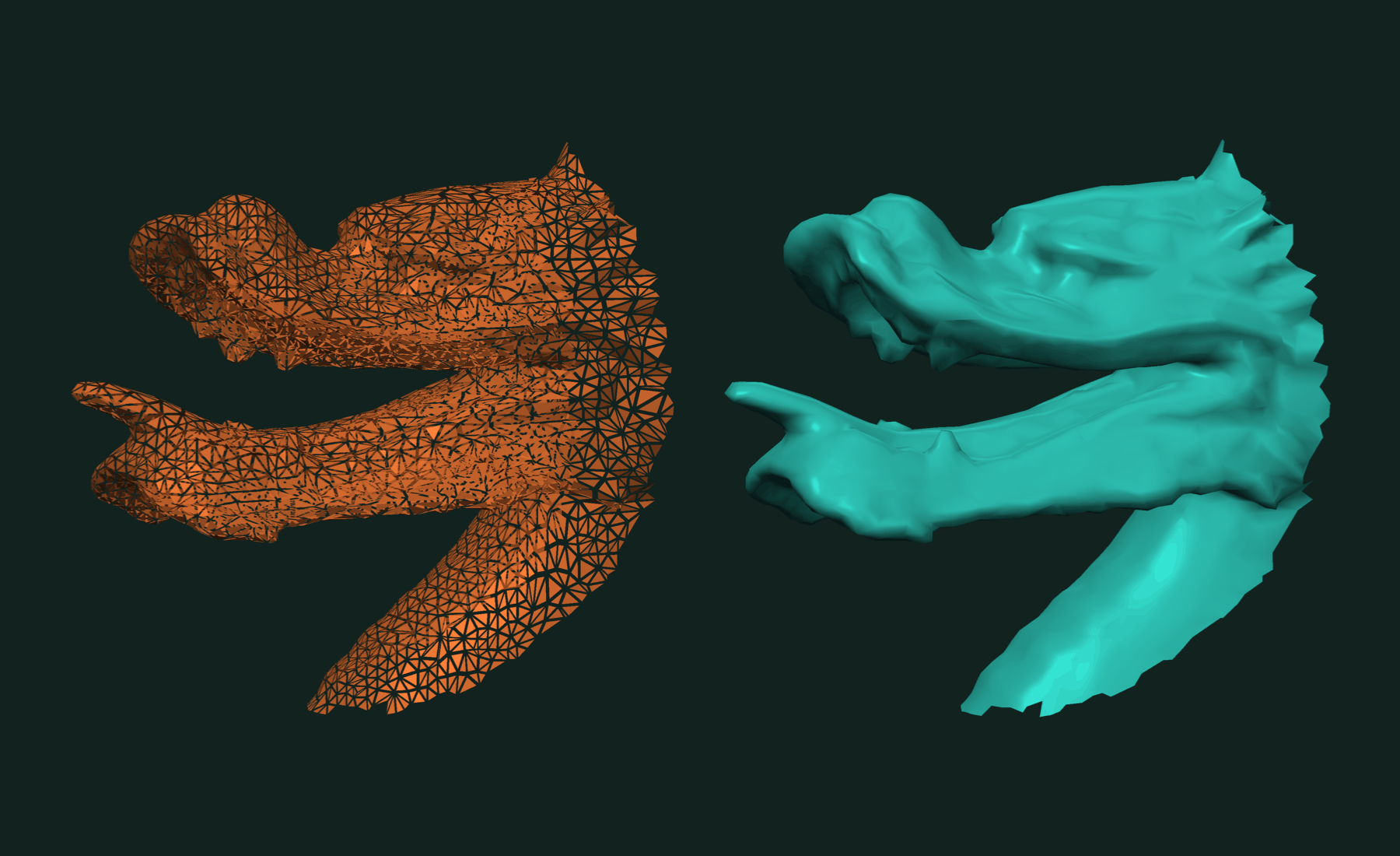
An STL file stores three corners per triangle with no sharing. tf.read_stl merges corners at the same position, so points holds each vertex once and faces indexes into it. The result is a connected mesh, ready for topology queries.
Wrap the arrays in a tf.Mesh to use them with the rest of the library:
mesh = tf.Mesh(*tf.read_stl("model.stl"))
print(mesh)     # Mesh(... points, ... faces, 3-gon, 3D, dtype=float32)
For meshes with more than 2 billion vertices, ask for int64 indices:
faces, points = tf.read_stl("model.stl", index_dtype=np.int64)
Reading OBJ
OBJ files may mix triangles, quads and larger polygons. By default tf.read_obj returns the faces as an OffsetBlockedArray, one block per face:
faces, points = tf.read_obj("model.obj")
print(type(faces).__name__)         # OffsetBlockedArray
print(faces[0])                     # vertex ids of face 0
If you know the face size, ask for a fixed-width array:
tri_faces, points = tf.read_obj("model.obj", ngon=3) # (N, 3) int32
The point dtype is float32 by default. Pass dtype=np.float64 for double precision, and index_dtype=np.int64 for large meshes:
faces, points = tf.read_obj("model.obj", ngon=3, dtype=np.float64, index_dtype=np.int64)
Quads and mixed polygons
A small quad mesh shows the two forms:
with open("quads.obj", "w") as f:
    f.write("v 0 0 0\nv 1 0 0\nv 1 1 0\nv 0 1 0\nv 2 0 0\nv 2 1 0\n")
    f.write("f 1 2 3 4\nf 2 5 6 3\n")

quads, points = tf.read_obj("quads.obj", ngon=4)
print(quads)                        # [[0 1 2 3] [1 4 5 2]]

poly_faces, points = tf.read_obj("quads.obj")
quad_mesh = tf.Mesh(poly_faces, points)
print(quad_mesh)                    # Mesh(6 points, 2 faces, dynamic, 3D, dtype=float32)
OBJ indices start at 1; the arrays start at 0. To get triangles from polygons, use tf.triangulated:
tri_faces, tri_points = tf.triangulated((poly_faces, points))
print(tri_faces.shape)              # (4, 3)
Writing STL and OBJ
Both writers take a (faces, points) tuple or a tf.Mesh and return True on success:
faces, points = tf.read_stl("model.stl")

tf.write_stl((faces, points), "out.stl")
tf.write_obj((faces, points), "out.obj")
tf.write_obj(quad_mesh, "quads_out.obj")    # polygons stay polygons in OBJ
STL holds triangles only. OBJ keeps quads and mixed polygons as they are.
Writing with a transformation
Pass a 4×4 matrix to place the mesh as it is written. The arrays are not changed.
T = np.eye(4, dtype=np.float32)
T[:3, 3] = [0.0, 0.0, 5.0]          # move up by 5

tf.write_stl((faces, points), "moved.stl", transformation=T)
A transformation set on a tf.Mesh is applied too:
mesh = tf.Mesh(faces, points)
mesh.transformation = T
tf.write_stl(mesh, "moved.stl")
Working with results
The arrays are plain NumPy, so they go straight into any NumPy code or into the rest of trueform: booleans, decimation, hole filling, connected components. A round trip keeps the data:
faces, points = tf.make_sphere_mesh(1.0, stacks=100, segments=200)
tf.write_obj((faces, points), "sphere.obj")

faces2, points2 = tf.read_obj("sphere.obj", ngon=3)
print(np.array_equal(faces, faces2), np.allclose(points, points2))    # True True
Related tutorials
- Fast Mesh Booleans in Python — exact union, intersection and difference of two meshes.
- Fast and Robust Closest Point on a Mesh in Python — nearest surface point for a batch of queries.
- Fast Connected Components in Python — split a mesh into parts and find its boundary loops.
- Fast and Robust Principal Curvatures of a Mesh in Python — curvature values and directions at every vertex.
- Fast and Exact Constrained Delaunay Triangulation in Python — triangulate points and outlines, with holes and constraints.
Performance
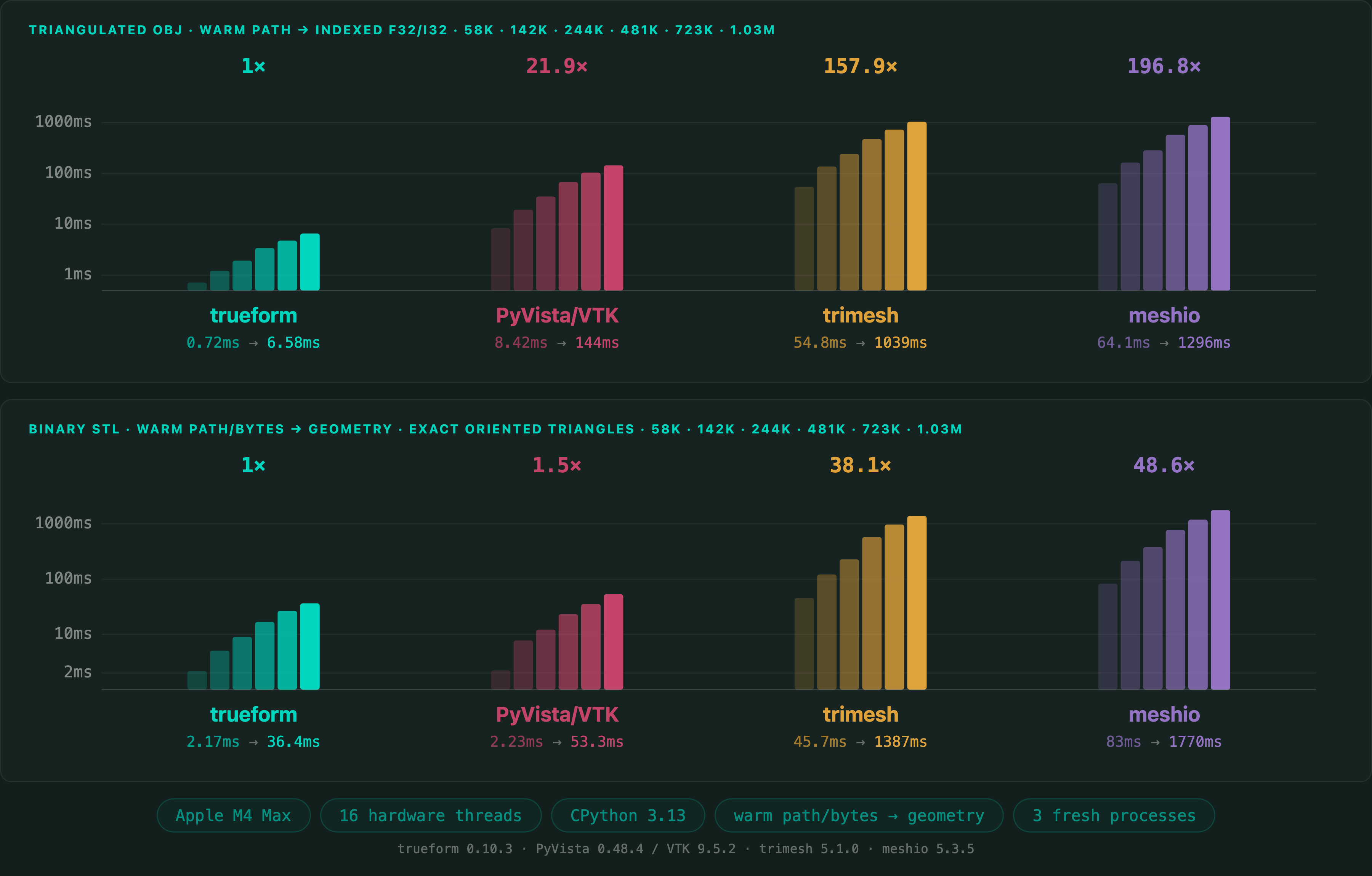
Read times on a 1,025,766-triangle mesh, in Python. OBJ is read as triangles into float32 points and int32 faces. Binary STL is read and welded exactly into shared vertices. Times include opening the file, parsing, and building the output arrays.
Apple M4 Max 16 threads
Of the four readers measured, trueform is the fastest on both formats: 22× PyVista/VTK, 158× trimesh and 197× meshio on OBJ; 1.5× PyVista/VTK, 38× trimesh and 49× meshio on STL. Median of three fresh-process medians. Benchmark run with trueform 0.10.3, PyVista 0.48.4 / VTK 9.5.2, trimesh 5.1.0 and meshio 5.3.5.
Full benchmarks · Documentation
@article{polydera:fast-stl-and-obj-reading-in-python,
  title={Fast STL and OBJ Reading in Python},
  author={Sajovic, {\v{Z}}iga, Polydera},
  year={2026},
  url={https://polydera.com/tutorials/fast-stl-and-obj-reading-in-python},
  organization={Polydera}
}