Fast STL and OBJ Reading in C++
Read and write STL and OBJ mesh files in C++ into indexed float/int buffers. A 1M-triangle OBJ in 6.5 ms and a welded binary STL in 42.5 ms, measured against RapidObj, tinyobjloader, stl_reader, VTK, libigl and CGAL.
Most mesh work starts with a file. trueform reads STL (binary and ASCII) and OBJ into indexed buffers: one flat array of points, one of face indices. STL corners are welded on load, so the result is a connected mesh. It is header-only C++17. This page covers reading STL and OBJ, quads and mixed polygons, normals, texture coordinates and groups, writing files, and handing the data to your own code.
Install
Header-only. It needs C++17 and oneTBB. Add it to your project via CMake FetchContent:
FetchContent_Declare(
  trueform
  GIT_REPOSITORY https://github.com/polydera/trueform
)
FetchContent_MakeAvailable(trueform)
target_link_libraries(my_app PRIVATE tf::trueform)
Also available via conan, nuget, and pip. See the installation guide for all options.
Reading STL
#include <trueform/trueform.hpp>

auto polygons = tf::read_stl("model.stl");
// tf::polygons_buffer<int, float, 3, 3>

auto faces = polygons.faces();    // (N, 3) vertex ids
auto points = polygons.points();  // (M, 3) positions
auto mesh = polygons.polygons();  // the mesh view the rest of the library takes
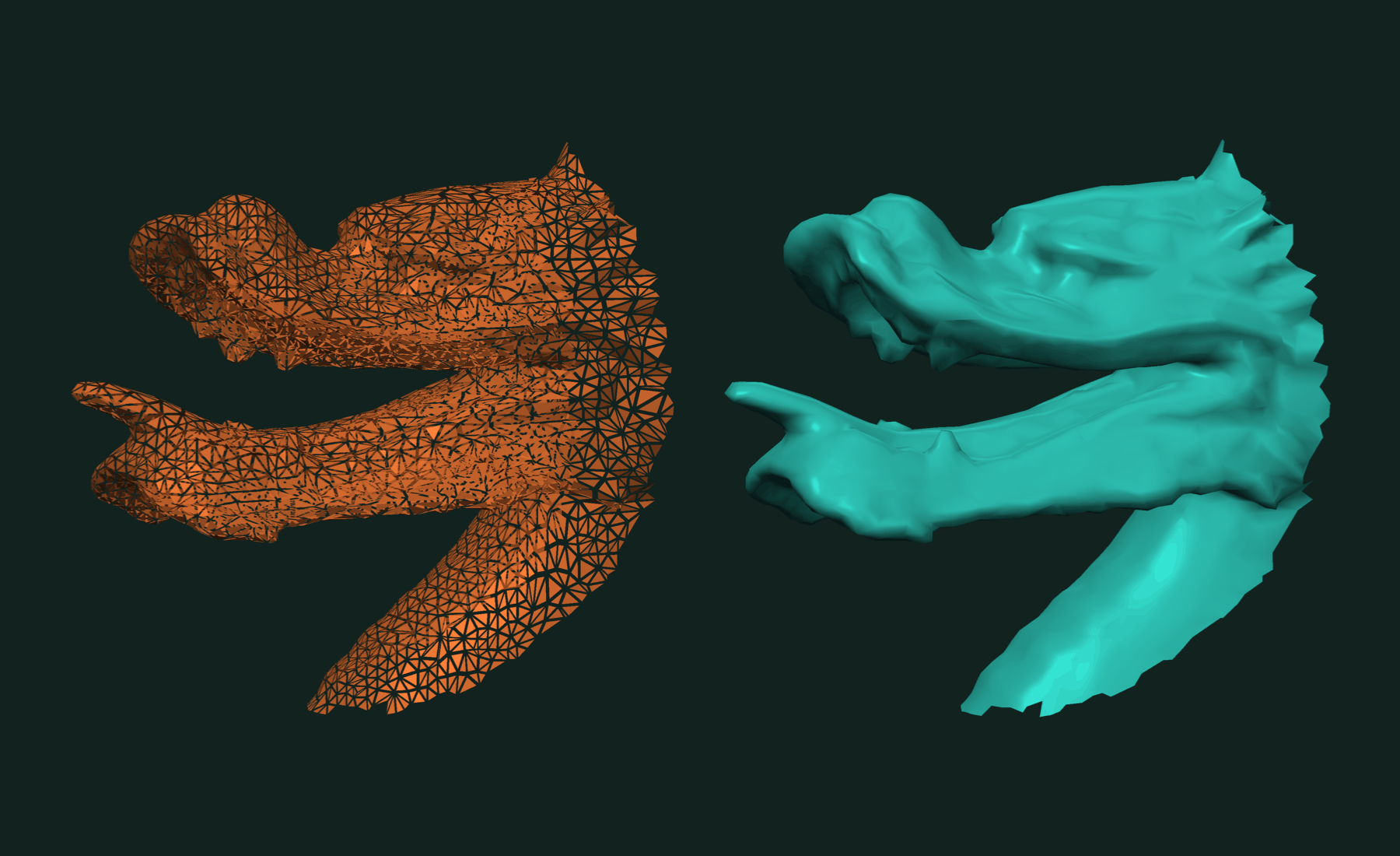
tf::read_stl detects binary or ASCII. An STL file stores three corners per triangle with no sharing. The reader merges corners at the same position, so points holds each vertex once and faces indexes into it. The mesh is ready for topology queries such as connected components.
For meshes with more than 2 billion vertices, ask for 64-bit indices:
auto large = tf::read_stl<int64_t>("model.stl");
Reading OBJ
OBJ files may mix triangles, quads and larger polygons. By default tf::read_obj returns faces of any length:
auto mesh = tf::read_obj("model.obj");
// tf::polygons_buffer<int, float, 3, tf::dynamic_size>
auto first = mesh.faces()[0];     // vertex ids of face 0, any length
If you know the face size, state it. The faces then come back as a fixed-width block:
auto triangles = tf::read_obj<3>("model.obj");
// tf::polygons_buffer<int, float, 3, 3>
auto large = tf::read_obj<int64_t, 3>("model.obj");
The reader maps the file instead of copying it, so do not modify the file while it is read. OBJ indices start at 1; the buffers start at 0. The default mode reads positions only.
Quads and mixed polygons
A small quad file shows the two forms:
std::ofstream("quads.obj") << "v 0 0 0\nv 1 0 0\nv 1 1 0\nv 0 1 0\nv 2 0 0\nv 2 1 0\n"
                              "f 1 2 3 4\nf 2 5 6 3\n";

auto quads = tf::read_obj<4>("quads.obj");
auto [a, b, c, d] = quads.faces()[1];  // 1, 4, 5, 2
To get triangles from polygons, use tf::triangulated:
auto poly = tf::read_obj("quads.obj");
auto tris = tf::triangulated(poly.polygons());
// tris.faces().size() == 4
Normals, texture coordinates and groups
Pass tf::complete to read everything the file carries. Each unique position, texture and normal triplet becomes one vertex, so all per-vertex buffers line up:
auto f = tf::read_obj("textured.obj", tf::complete);

auto points = f.polygons.points();
auto normals = f.normals;              // aligned with points, or empty
auto textures = f.textures;            // aligned with points, or empty
auto &face_groups = f.face_groups;     // per face, index into group_names
auto &group_names = f.group_names;
A position with two different normals or texture coordinates becomes two vertices, as at a texture seam or a sharp edge. Negative (relative) indices are not supported in this mode; such a file returns an empty result.
Writing STL and OBJ
The writers take any mesh view. Your own arrays work without a copy:
std::vector<float> flat_points = {0, 0, 0, 1, 0, 0, 0, 1, 0};
std::vector<int> flat_triangles = {0, 1, 2};

auto mesh = tf::make_polygons(tf::make_faces<3>(flat_triangles),
                              tf::make_points<3>(flat_points));
bool ok = tf::write_stl(mesh, "triangle.stl");
tf::write_obj(mesh, "triangle.obj");
tf::write_stl writes binary STL and needs triangles. tf::write_obj keeps quads and mixed polygons as they are. Both return true on success.
To place a mesh as it is written, tag a transformation on the view. The data is not changed:
auto T = tf::make_transformation_from_translation(
    tf::make_vector(0.f, 0.f, 5.f));
tf::write_stl(polygons.polygons() | tf::tag(T), "moved.stl");
Working with results
The buffers own flat memory. Hand it to a renderer, a GPU upload or another library directly:
float *point_data = polygons.points_buffer().data_buffer().data();
int *face_data = polygons.faces_buffer().data_buffer().data();
polygons.polygons() goes straight into the rest of trueform: closest point, decimation, connected components, booleans.
Related tutorials
- Fast Mesh Booleans in C++ — exact union, intersection and difference of two meshes.
- Fast and Robust Closest Point on a Mesh in C++ — nearest surface point for a batch of queries.
- Fast Connected Components in C++ — split a mesh into parts and find its boundary loops.
- Fast and Robust Principal Curvatures of a Mesh in C++ — curvature values and directions at every vertex.
- Fast and Exact Constrained Delaunay Triangulation in C++ — triangulate points and outlines, with holes and constraints.
Performance
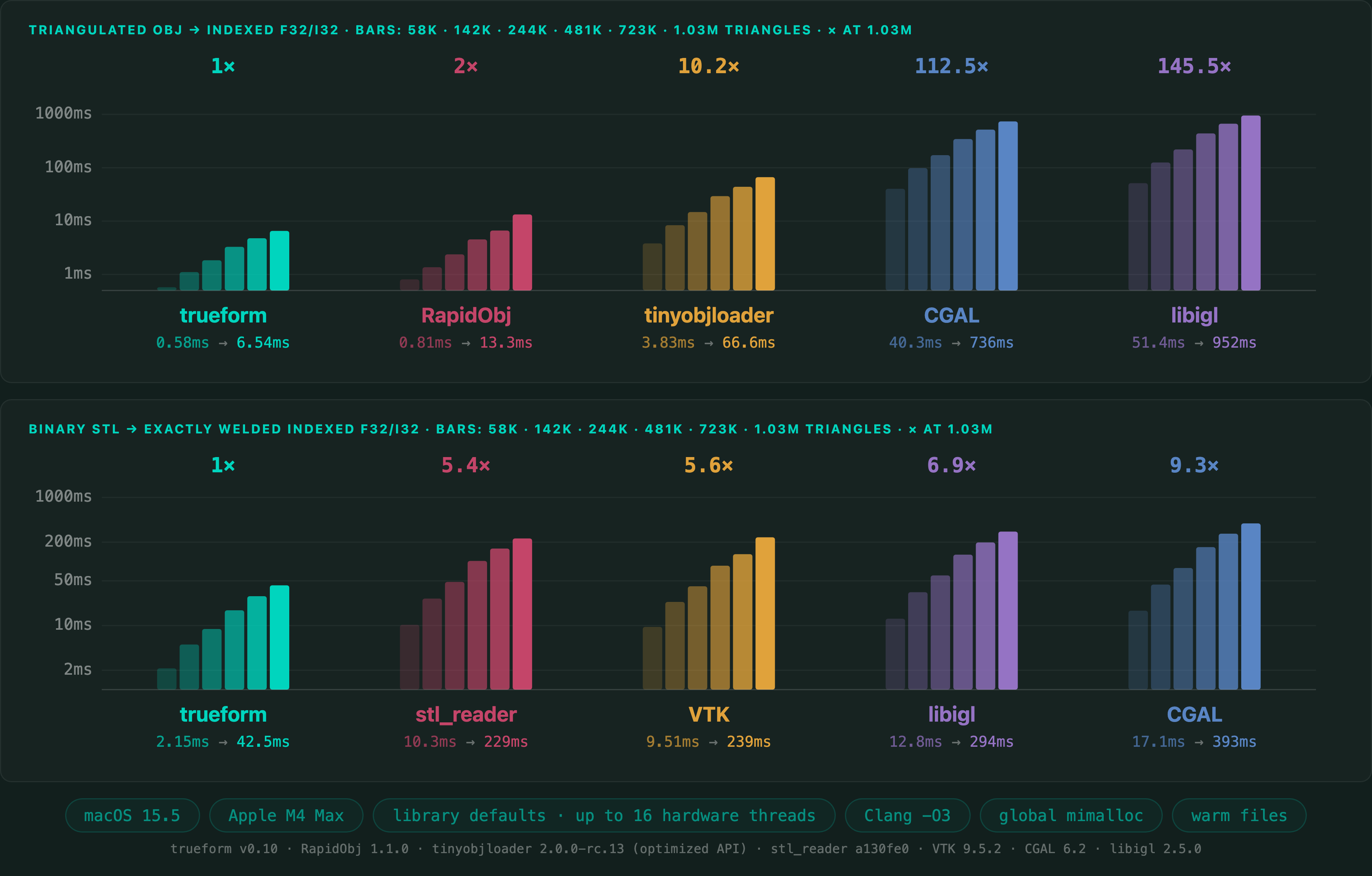
Read times on a 1,025,766-triangle mesh, in C++. OBJ is a triangulated file read into float32 points and int32 faces. Binary STL is read and welded exactly into shared vertices. Times include opening the file, parsing, and building the output.
Apple M4 Max 16 threads mimalloc
Of the readers measured, trueform is the fastest on both formats. Median of three fresh-process medians, seven samples per process. Benchmark run with RapidObj 1.1.0, tinyobjloader 2.0.0-rc.13, VTK 9.5.2, CGAL 6.2 and libigl 2.5.0.
Full benchmarks · Documentation
@article{polydera:fast-stl-and-obj-reading-in-cpp,
  title={Fast STL and OBJ Reading in C++},
  author={Sajovic, {\v{Z}}iga, Polydera},
  year={2026},
  url={https://polydera.com/tutorials/fast-stl-and-obj-reading-in-cpp},
  organization={Polydera}
}