Fast STL and OBJ Reading in JavaScript
Read and write STL and OBJ mesh files in JavaScript and TypeScript, in Node.js and the browser. A 1M-triangle OBJ in 11.0 ms and a welded binary STL in 36.6 ms, measured against Three.js loaders. WebAssembly-powered, one npm install.
Most mesh work starts with reading a file, and on large meshes the reader can take longer than the work. trueform reads STL and OBJ from bytes into a mesh: an [N, 3] face array and an [M, 3] point array. STL triangles are welded into shared vertices as they load. It works in JavaScript and TypeScript with one npm install, WebAssembly-powered, in Node.js and the browser with the same API. This tutorial covers reading and writing both formats, triangles, quads and mixed polygons, double precision, writing with a transformation, and measured read times against the Three.js loaders.
Install
npm install @polydera/trueform
The package ships TypeScript types. The WebAssembly binary loads on first use. In the browser, multithreading needs SharedArrayBuffer headers; see the installation guide.
Reading STL
All readers take the file's bytes, as a Uint8Array or an ArrayBuffer. In Node.js, readFileSync returns a Buffer, which is a Uint8Array:
import * as tf from "@polydera/trueform";
import { readFileSync } from "node:fs";

const mesh = tf.readStl(readFileSync("model.stl"));
mesh.faces;     // NDArrayInt32   [N, 3]
mesh.points;    // NDArrayFloat32 [M, 3]
In the browser, from fetch or a file input:
const response = await fetch("model.stl");
const mesh = tf.readStl(new Uint8Array(await response.arrayBuffer()));

const file = input.files[0];
const mesh2 = tf.readStl(new Uint8Array(await file.arrayBuffer()));
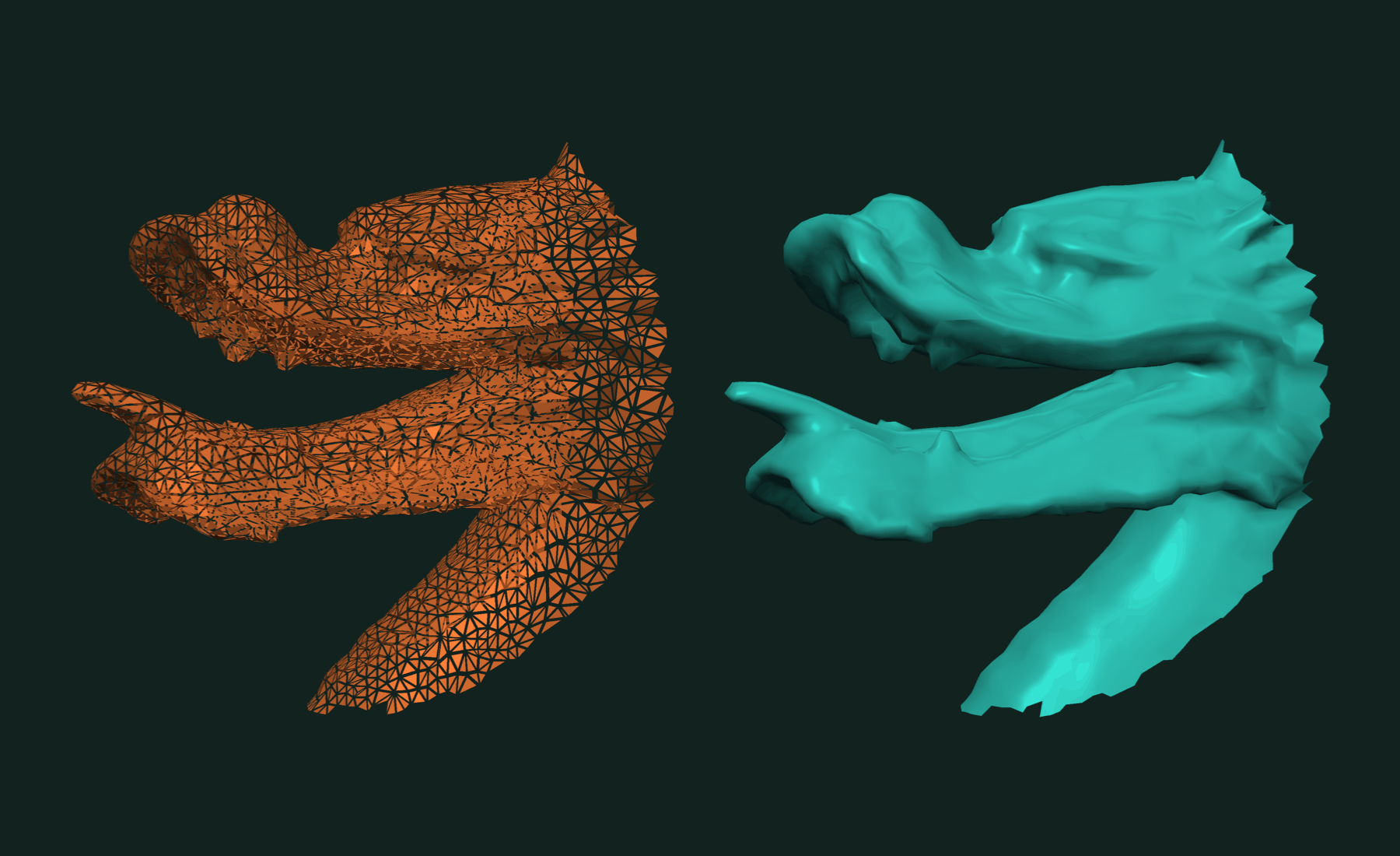
An STL file stores three corners per triangle with no sharing. tf.readStl merges corners at the same position, so points holds each vertex once and faces indexes into it. The result is a connected mesh, ready for topology queries. Binary and ASCII STL both work. STL stores float32 by spec, so the mesh is always float32.
Reading OBJ
const mesh = tf.readObj(readFileSync("model.obj"));
By default tf.readObj expects triangles. Pass { dtype: "float64" } for double-precision points:
const mesh64 = tf.readObj(readFileSync("model.obj"), { dtype: "float64" });
mesh64.dtype;   // "float64"
Only positions and faces are read. Normals, texture coordinates, materials and groups are skipped.
Quads and mixed polygons
OBJ files may mix triangles, quads and larger polygons. Pass { dynamic: true } to read every polygon and triangulate it on load:
import { writeFileSync } from "node:fs";

writeFileSync("quads.obj",
  "v 0 0 0\nv 1 0 0\nv 1 1 0\nv 0 1 0\nv 2 0 0\nv 2 1 0\n" +
  "f 1 2 3 4\nf 2 5 6 3\n");

const quads = tf.readObj(readFileSync("quads.obj"), { dynamic: true });
quads.numberOfFaces;   // 4 triangles from 2 quads
Without { dynamic: true }, a file of quads reads as a mesh with 0 faces. If a mesh comes back empty, this is the first thing to check.
To see the polygons before triangulating, read the raw data. Faces come back as an OffsetBlockedBuffer, one block per polygon:
const raw = tf.readObjData(readFileSync("quads.obj"), { dynamic: true });
raw.faces.length;          // 2 polygons
raw.faces.get(0).data;     // Int32Array [0, 1, 2, 3]

const mesh = tf.triangulate(raw);   // 4 triangles
OBJ indices start at 1; the arrays start at 0. tf.readStlData gives the same raw { faces, points } view for STL.
Writing STL and OBJ
tf.writeStl and tf.writeObj return the file as bytes. .data is the typed array:
writeFileSync("out.stl", tf.writeStl(mesh).data);   // binary STL
writeFileSync("out.obj", tf.writeObj(mesh).data);   // ASCII OBJ
In the browser, wrap the bytes in a Blob to download or upload them. The bytes live in WebAssembly memory, which is shared when threads are on, and browsers refuse a Blob built over shared memory. .slice() copies them into a plain buffer first:
const bytes = tf.writeStl(mesh).data.slice();
const blob = new Blob([bytes], { type: "model/stl" });
const url = URL.createObjectURL(blob);
OBJ output matches the mesh dtype: float32 points are written with 9 significant digits, float64 with 17, enough for an exact round trip.
Writing with a transformation
A transformation set on the mesh is applied as it is written. The points in memory do not change. Use a shallow copy to write a moved version without touching the original:
const moved = mesh.shallowCopy();
moved.transformation = tf.makeTranslation(0, 0, 5);   // move up by 5

writeFileSync("moved.stl", tf.writeStl(moved).data);
Working with results
The mesh goes straight into the rest of trueform: booleans, decimation, closest points, connected components. For Three.js, faces.data and points.data become the index and position attributes of a BufferGeometry.
A round trip keeps the data:
const sphere = tf.sphereMesh(1.0, 100, 200);
writeFileSync("sphere.obj", tf.writeObj(sphere).data);

const back = tf.readObj(readFileSync("sphere.obj"));
// back.faces and back.points equal sphere.faces and sphere.points
To parse off the main thread, use the async twins:
const mesh = await tf.async.readStl(bytes);
const stl = await tf.async.writeStl(mesh);
Related tutorials
- Fast Mesh Booleans in JavaScript — exact union, intersection and difference of two meshes.
- Fast and Robust Closest Point on a Mesh in JavaScript — nearest surface point for a batch of queries.
- Fast Connected Components in JavaScript — split a mesh into parts and find its boundary loops.
- Fast and Robust Principal Curvatures of a Mesh in JavaScript — curvature values and directions at every vertex.
- Fast and Exact Constrained Delaunay Triangulation in JavaScript — triangulate points and outlines, with holes and constraints.
Performance
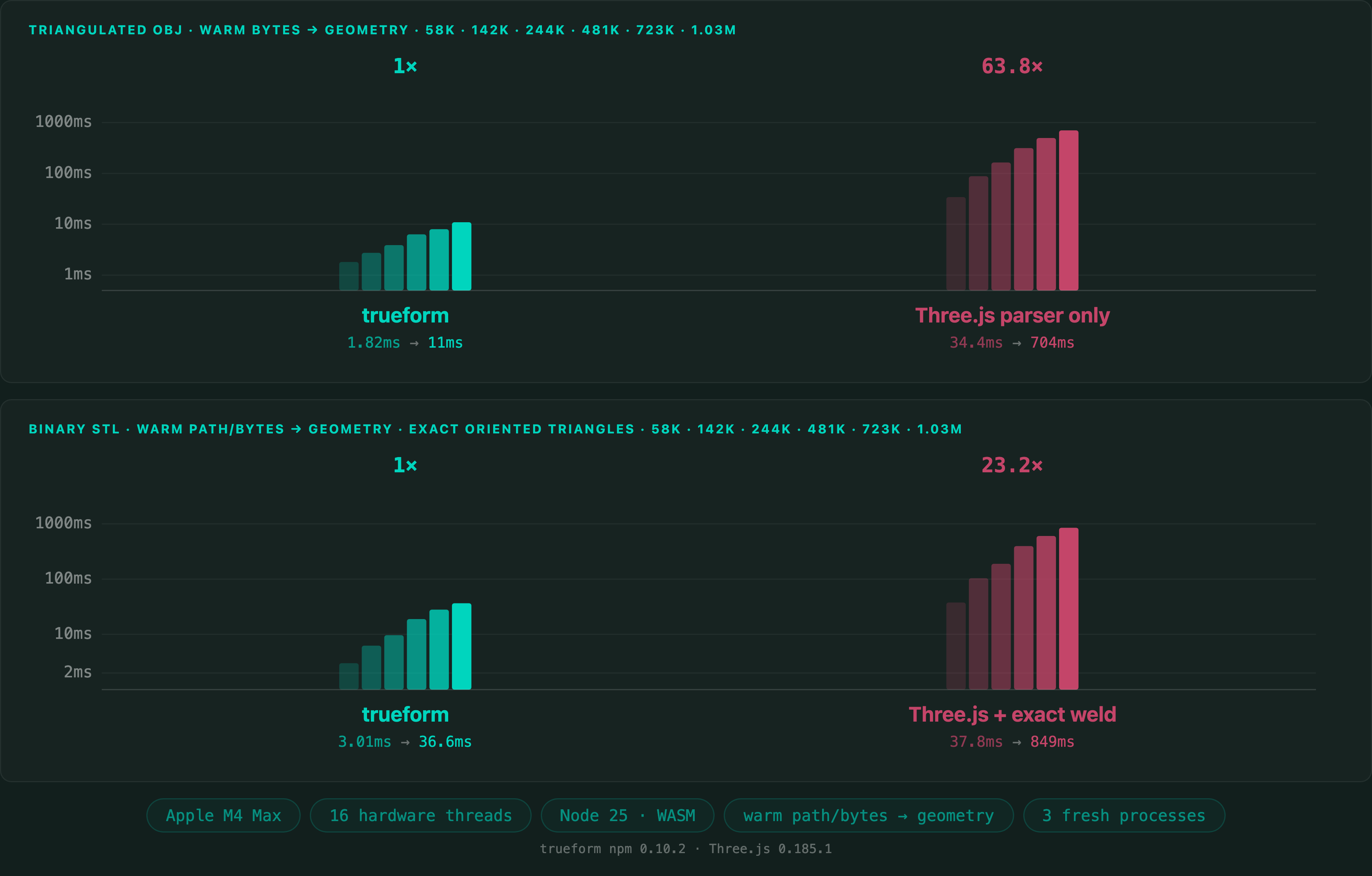
Read times for the Stanford Dragon at 1,025,766 faces. For STL the comparison is Three.js STLLoader followed by an exact weld, so both sides return a shared-vertex mesh. For OBJ it is the Three.js OBJLoader parser alone.
Apple M4 Max 16 threads Node.js WebAssembly
Median of three fresh-process medians. Benchmark run with trueform npm 0.10.2 and Three.js 0.185.1.
Full benchmarks · Documentation
@article{polydera:fast-stl-and-obj-reading-in-javascript,
  title={Fast STL and OBJ Reading in JavaScript},
  author={Sajovic, {\v{Z}}iga, Polydera},
  year={2026},
  url={https://polydera.com/tutorials/fast-stl-and-obj-reading-in-javascript},
  organization={Polydera}
}